WorkSchedule rota software for UK teams
Plan the week with UK working-time checks and live labour-cost estimates, including employer NIC, pension and optional holiday accrual. Free Starter includes these essentials for up to 10 employees; Professional adds monthly views and imports.
No credit card required · UK-built & hosted

Why teams swap spreadsheets for proper rota software
Excel and WhatsApp work — until they don't. The same problems show up in every team that outgrows them:
Hours wasted every week
A typical manager spends 3–5 hours per week building, fixing and reissuing the rota in Excel.
Missed shifts & no-shows
Without instant updates, the staff member who agreed to cover Friday never sees the change.
Costs and rest gaps hidden
See rest-gap warnings and weekly labour-cost estimates, rather than relying on manual spreadsheet formulas.
Last-minute chaos
Sickness, swap requests and time off live in three different chats. Nobody has the live picture.
Everything you need to run the rota
Built around how UK managers actually plan the week — not generic enterprise scheduling bloat.
Drag-and-drop weekly rota
Build the week visually. Reusable shift templates, copy-week and bulk-edit make repeat planning fast.
Availability & time off
Staff submit availability and request time off — approvals appear directly on the rota.
Instant publish & notify
Publish the rota and the team is notified in real time. No more screenshots in WhatsApp.
Mobile-friendly for staff
Employees see their shifts on any phone — no app install, no friction, no excuses.
UK Working Time rules, built in
Starter and Professional check 11-hour daily rest, weekly rest and under-18 limits. Average-hours checks use a 17-week reference period where applicable. Manager-authorised adult rest exceptions record reasons and compensatory rest; warnings remain visible.
Checks and reports support record keeping, not a guarantee of legal compliance. Automated 20-minute break checks are currently inactive.
Free essentials. Professional extras.
Starter is free forever for up to 10 employees — no credit card required. Professional is a paid plan from £2.25/month after a 14-day free trial. The £2.25/month minimum still applies under 10 employees; each employee beyond 10 adds another £2.25/month.
Starter · Free for up to 10 employees
Weekly rotas with reusable templates and copy-week, staff access on any phone, time-off requests and approvals, UK working-time checks and reports. Authorised managers can see live labour-cost estimates — including employer NIC, pension and optional holiday accrual — and export labour-cost reports as CSV. No card or expiry.
Professional · Paid, after a 14-day trial
Everything in Starter, plus monthly schedule views, delegated admin-team roles, bulk staff CSV import, Excel/CSV rota import, custom branding and private support chat. Grow beyond 10 employees.
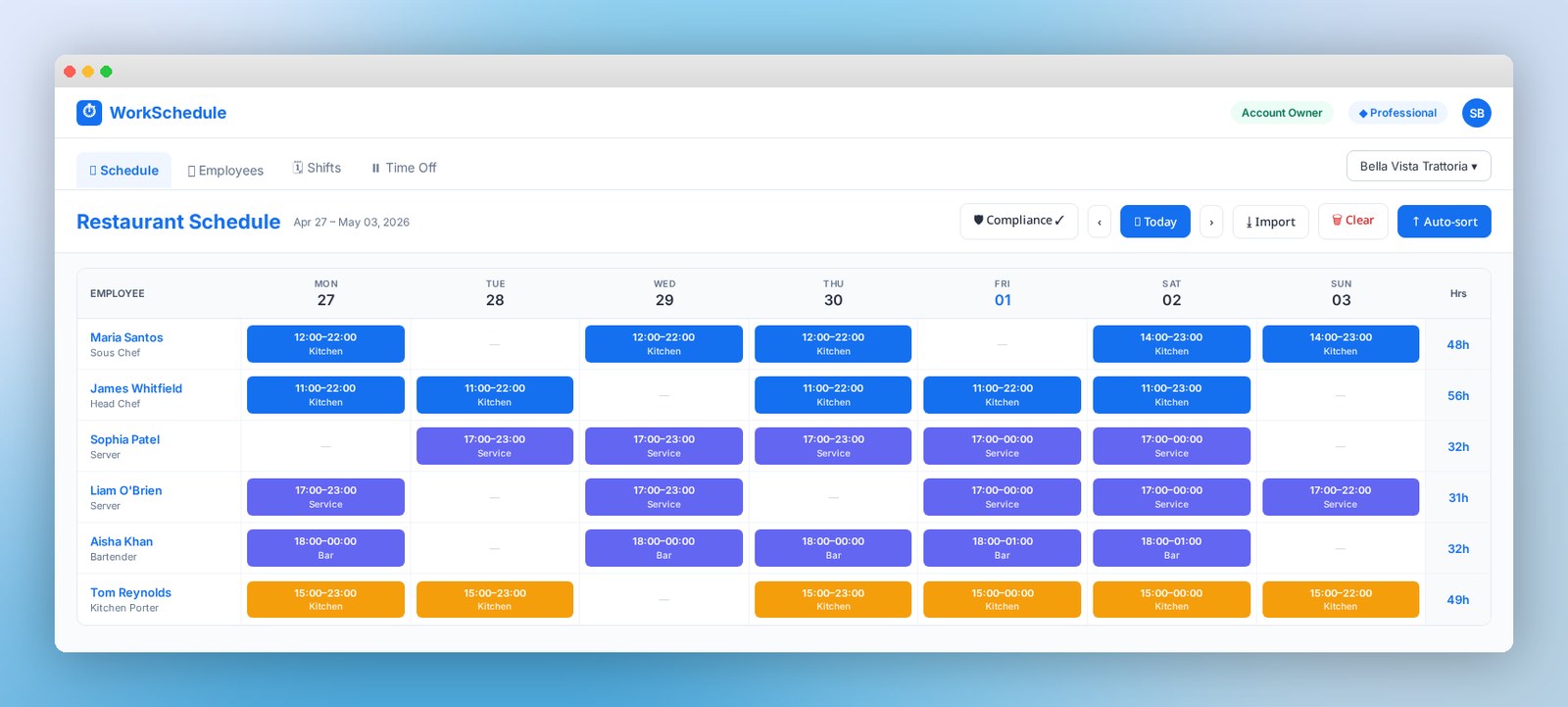
A weekly rota you can actually read
See the whole week at a glance. Hours per person roll up automatically — no more spreadsheet maths, no more "wait, who's on Friday night?"
From sign-up to published rota in 4 steps
- 1
Add your team
Add staff individually; Professional also supports bulk CSV import. Set contracted hours and availability.
- 2
Build the week
Drag shift templates onto the rota. Spot conflicts as you go.
- 3
Publish & notify
Hit publish — the team is notified instantly, on any device.
- 4
Handle the changes
Approve swaps, log time off and rebuild next week from a copy in minutes.
Spreadsheets vs enterprise tools vs WorkSchedule
Built for UK SMBs — the right balance of speed, simplicity and compliance.
| Feature | Spreadsheet | Enterprise tool | WorkSchedule |
|---|---|---|---|
| Time to build a week | Hours | Hours (after setup) | Minutes |
| Mobile access for staff | |||
| UK Working Time warnings | |||
| Free for small teams | |||
| Setup time | Low | Weeks | Under an hour |
Rota software for your industry
See how WorkSchedule fits the shape of your week.
More rota resources
Free templates, the online rota maker, and the staff app — all in one place.
How WorkSchedule compares
Weighing up alternatives? See side-by-side feature comparisons against the most-searched UK rota tools.
Frequently Asked Questions
What is rota software?+
Rota software is an online tool for planning, sharing and managing staff working schedules. It replaces spreadsheets and printed rotas with a single live schedule everyone can see on their phone or laptop.
Is WorkSchedule free?+
Yes — Starter is free for up to 10 employees, including weekly rotas, UK checks and labour-cost estimates. Professional adds monthly views, role-based access and imports. It costs £2.25/month minimum after a 14-day trial, plus £2.25/month per employee beyond 10.
How long does it take to build a rota?+
Most managers create their first weekly rota in under 30 minutes. Reusable shift templates and copy-week make subsequent weeks take just a few minutes.
Does it work for hospitality, retail and care?+
Yes. WorkSchedule is built for any UK team that runs a weekly rota — restaurants, cafés, bars, pubs, hotels, retail, salons, gyms and care providers all use it.
Can my team see their shifts on a phone?+
Yes. Staff can view their published rota, request time off and swap shifts from any browser on their phone — no app install required.
Does it help with UK working time rules?+
Both plans include daily-rest, weekly-rest and under-18 checks, plus a 48-hour average-hours check over 17 weeks where applicable, excluding part-time and opted-out staff. Adult rest exceptions require a manager reason and compensatory-rest details; warnings remain. Checks and reports support decisions, not proof of legal compliance.
Can I import my existing rota?+
Professional includes bulk employee CSV import and Excel/CSV rota import with a preview. On Starter, add staff individually and build your weekly rota. Review rest warnings after import; importing never authorises an exception.
How we compare
Side-by-side breakdowns vs the rota apps UK hospitality teams ask about most.
WorkSchedule vs RotaCloud
Compare free plans, UK checks and labour costing with dated sources.
See the comparisonWorkSchedule vs Deputy
Compare UK pricing, rest checks and employer on-cost estimates.
See the comparisonWorkSchedule vs Findmyshift
Cheaper than Findmyshift with built-in UK working time checks.
See the comparisonWorkSchedule vs Planday
A simpler, UK-priced alternative to Planday for small teams.
See the comparisonWorkSchedule vs When I Work
UK-built rota software vs the US incumbent — pricing in £, GDPR-hosted.
See the comparisonExplore other hospitality guides
See how WorkSchedule fits other parts of UK hospitality.
Related guides
All guidesClopening shifts: what they are and why to avoid them
A "clopening" is when the same worker closes one night and opens the next morning. Here is why they hurt UK hospitality teams, the legal risks, and how to schedule around them.
Read guideHow to write a fair shift swap policy (UK template)
A practical template for a UK hospitality shift swap policy — who can swap with whom, approval rules, deadlines, and how to keep working time compliance intact.
Read guideCalculating overtime pay in the UK (2026)
A clear UK overtime guide for employers — what counts as overtime, when extra pay is legally required, common premium rates (1.25x and 1.5x), and how to calculate it.
Read guide